Style Viewer Panel
GeoCat Bridge offers a way to preview a layer style (symbology) in several different formats using the Style Viewer.
You can open the Style Viewer panel by clicking Bridge Style Viewer from the GeoCat Bridge menu:
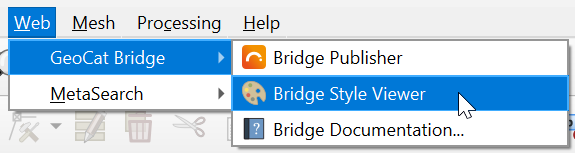
Alternatively, you can open the panel using View → Panels → Bridge Style Viewer in the QGIS menu bar.
A dockable panel will now be displayed (initially on the right side of the screen) that looks similar to this:
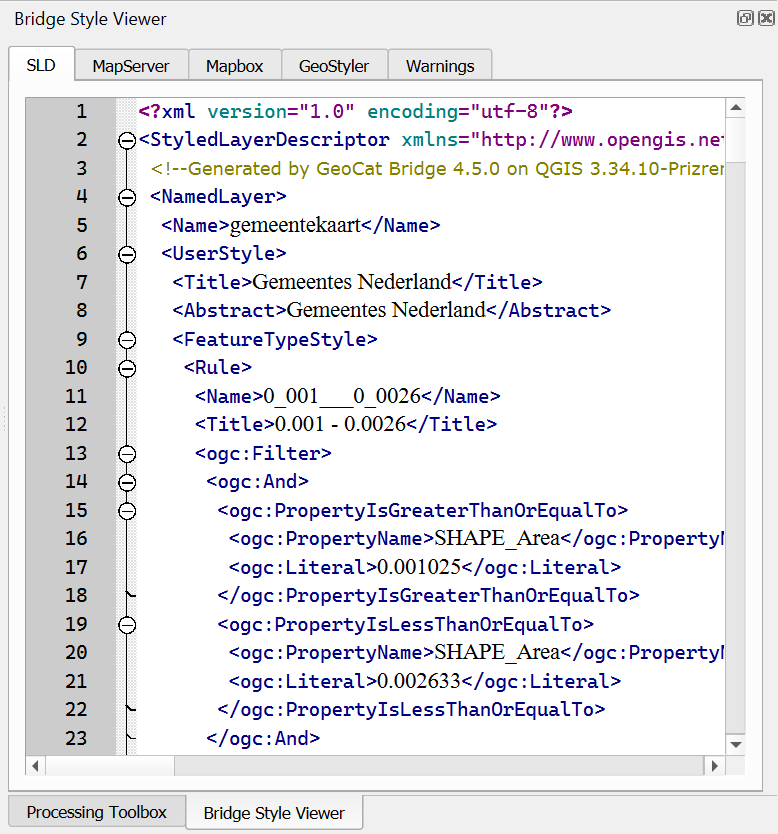
If you wish to close the Style Viewer, click the close button (x) in the upper-right corner of the panel or uncheck the View → Panels → Bridge Style Viewer item in the QGIS menu bar.
Currently, Style Viewer supports the following style formats:
- SLD (XML): used by GeoServer
- MapServer style (plain text): also known as Mapfile
- Mapbox style (JSON): used for vector tiles
- GeoStyler (JSON)
The Style Viewer is context-aware, meaning that it will show style previews for the currently selected layer in the QGIS Layers panel:
For more information about how Bridge handles symbology and which style elements are supported, please read the Supported Symbology section.
Note
- If the layer is not supported by Bridge (see Supported layer types), nothing will be shown.
- If there were issues during the style conversion process, these will be displayed on the Warnings tab.